
FreePrints
PlanetArtPhotography
4.8100.58K Reviews
- Version
- 4.50.0
- Installs
- 10.00M
- Age Rating
- Everyone
Screenshots
Our Review of FreePrints
 Analysis by Appyee
I like photo apps that solve a real problem after the picture has already been taken. FreePrints is built for that moment: you have a phone full of family snapshots, travel memories, school photos, or small creative projects, and you want some of them to exist outside the screen. Developed by PlanetArt, this free photography app turns the selection and ordering process into its main creative workflow rather than trying to replace a full photo editor.
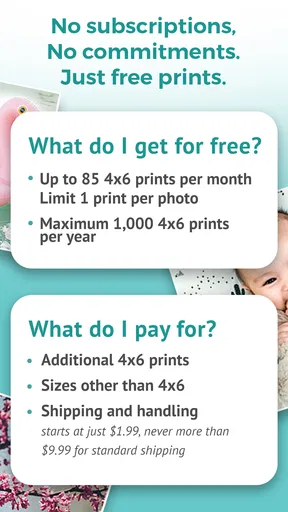
That distinction matters. I would not open it expecting layers, advanced retouching, or a complete publishing studio. I use it more like a bridge between my camera roll and physical prints. The app’s central offer is especially appealing if you want to print up to 1,000 4x6 photos per year without a subscription or long-term commitment. You still need to pay attention to the order details, but the basic idea is refreshingly straightforward.
From a crowded camera roll to a clear print project
The first creative decision is not an effect or filter; it is deciding which images deserve a physical copy. That sounds simple, but it is where many printing workflows become tiring. FreePrints is useful because it keeps the focus on choosing images and preparing them for delivery instead of burying the task beneath a large editing interface.
In everyday use, I can imagine opening it after a birthday party and selecting the photos I want grandparents to keep. The same workflow works for a holiday album, a child’s first day at school, a small mood board, or a set of reference images for a craft project. The app is most comfortable when the creative output is a group of standard photo prints rather than a highly designed publication.
I also appreciate the psychological difference between printing a whole camera roll and creating a small, intentional batch. Choosing a few images makes the result feel more personal. My practical advice is to make the selection before you start the order: remove near-duplicates, blurry shots, screenshots, and photos that only look good because of the phone’s bright display. Printing exposes weak images more clearly than scrolling does.
The app has a broad audience, reflected in its Everyone content rating. It is suitable for a parent printing family memories, a student preparing visual references, or someone who simply wants a few pictures on a wall. At the same time, that accessible positioning does not mean every project will feel effortless. The more unusual your output, the more likely you are to need a different tool.
What the starting point is good at
FreePrints makes the most sense when your source material is already on your phone and your destination is a physical 4x6 print. That direct path removes several steps found in a desktop workflow: transferring files, opening a separate layout program, exporting copies, and then finding a printer service. For casual printing, fewer handoffs usually means fewer chances to lose track of the final image.
It is also a sensible option for people who do not want a subscription. The app is free to install, and its print offer is framed around no subscriptions and no commitments. I would still read the final order screen carefully before confirming anything, because a free print offer does not make every possible order configuration identical. The important habit is to distinguish the included print allowance from any other part of the checkout.
One non-obvious advantage is that the annual allowance encourages regular, small print sessions instead of one expensive-looking project. I could print a handful of recent memories after a weekend away, then return later for another batch. That suits people who want a living photo collection rather than a single formal album.
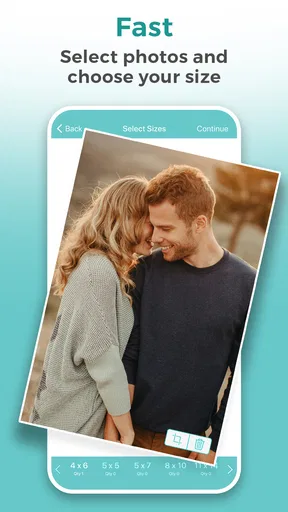
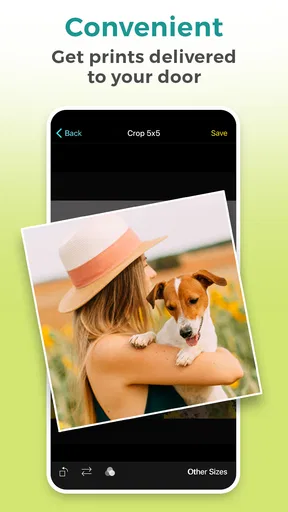
There is a trade-off, though. A standard print size is convenient, but it also imposes a visual decision on every image. Photos captured in tall phone formats or wide landscape compositions may not fit naturally. Before ordering, I would inspect the crop preview rather than assuming the entire frame will appear. If the subject sits close to an edge, cropping can remove the detail that made the photo worth printing.
Preparing images before the order
The strongest results usually come from doing a little preparation outside the ordering rush. I prefer to make basic corrections in the phone’s existing photo editor first: straighten a tilted horizon, adjust an image that is too dark, and check that skin tones or important details look reasonable. FreePrints is not the place I would rely on for a complete restoration workflow.
This is particularly important for older images, screenshots, and pictures shared through messaging apps. Compression may be invisible on a small phone screen but more obvious in print. A useful test is to zoom in on faces, lettering, and fine patterns before selecting the image. If those details already look soft, a physical copy will not magically restore them.
I also recommend creating a temporary album on the phone for the project. For example, I might call it “kitchen wall” or “grandparents.” This makes the app’s selection stage faster and reduces the chance of accidentally ordering several versions of the same picture. It is a small workflow improvement, but it turns a casual print request into a manageable creative brief.
When I am printing a set, I think about sequence as well as image quality. A group of photos can tell a story through arrival, activity, and departure, even when the app itself is not being used as a page-layout tool. That is one of the better ways to get more value from ordinary snapshots: curate them as a collection rather than judging every photo in isolation.
Making, checking, and handing off the finished set
I treat the final check as part of making the set, not as a box to rush through on the way to ordering. I look at each crop in context, remove duplicates, and consider whether the photos will work together once they are no longer arranged in a camera roll. That small pause can make a modest batch feel like a considered gift or keepsake rather than a random handful of prints.
The making process is mostly curation
Using FreePrints feels less like designing a poster and more like assembling a physical edit. I select the images, review how they fit the intended print format, and decide how many copies make sense. That makes it approachable, but it also means the quality of the final result depends heavily on my choices before pressing the order button.
For a family event, I would separate “must print” photos from “nice to have” photos. The first group might include one clear portrait of each person and a few moments that show the atmosphere. The second group can wait. This prevents the common mistake of ordering a large pile where the best images get lost among near-identical frames.
Another practical use is a small physical reference set for a creative project. A writer might print visual reminders for a workspace, or a hobbyist might keep images beside materials while planning a handmade gift. FreePrints is not a replacement for a professional proofing service, but standard photo prints can be a useful tactile checkpoint when a project has been living entirely on a screen.
The app’s store presence shows substantial adoption, with over 10 million installs, an average rating of 4.8, and around 356,000 ratings. Those figures suggest that the basic concept is resonating with many users, although popularity does not remove the need to check each image and order carefully. My own judgment is that its strength comes from a narrow, understandable job rather than from an unusually deep editing toolkit.
Iteration: the part I would not rush
Printing is an irreversible step compared with editing a digital file, so I treat the preview as an iteration stage. I look for accidental crops, distracting borders, closed eyes, and images that feel too similar when placed together. If a set contains ten photos from one moment, I ask whether three or four would communicate it better.
This is also where I decide whether an image belongs in the project at all. A picture can be emotionally important but technically weak. Sometimes I still print it because the memory matters; other times I keep it digital and choose a stronger frame. FreePrints makes that judgment visible, but it cannot make the personal decision for me.
A useful workflow is to order a small test group before committing to a larger display. I would choose images with different lighting conditions and compositions, then use the physical results to understand how my phone’s screen compares with printed output. This is especially helpful if I am planning a wall arrangement. The first batch teaches me whether my edits are too dark, whether the crops feel comfortable, and whether the chosen images work together.
The main friction is that a standard print service cannot compensate for every source problem. A photo with a strong color cast, heavy motion blur, or tiny text may remain disappointing. If my project depends on exact color matching, fine art reproduction, borderless control, or a specific paper finish, I would choose a specialist print lab instead. FreePrints is better suited to convenient everyday memories than demanding production work.
From digital file to physical handoff
The handoff stage is where the app becomes more than a gallery tool. My creative output leaves the phone and becomes something I can give away, arrange, annotate, or store. That is valuable because physical photos invite uses that a camera roll does not: a small gift, a refrigerator display, a memory box, or a conversation starter at home.
I would be especially likely to use it for people who are not deeply involved in my digital life. Sending a photo in a chat is quick, but handing someone a printed image feels more deliberate. A small set from a family gathering can be divided among relatives, while a travel collection can become a simple souvenir without the effort of making a full book.
For a publishing workflow, the app works best at the final, modest handoff: selected images become standard prints. It is not the right choice for exporting a polished magazine, a branded client presentation, or a carefully controlled portfolio. Those projects need typography, page composition, file specifications, and often color-managed production. Here, the output is intentionally simpler, which is precisely why it is convenient for personal use.
I would also keep the original digital files after ordering. The printed set is an output, not a backup strategy. Maintaining the originals makes it possible to correct an image later, print a different crop, or use the photo in another project. That separation between archive and print order is a small but important habit for anyone who takes photography seriously.
Who should use it, and who should skip it
I recommend FreePrints to someone who wants physical photos with minimal setup, does not want a subscription, and is comfortable working with ordinary phone images. It is a good fit for family snapshots, occasional gifts, simple memory collections, and small creative references. The free price makes experimentation easier, provided the user checks the order summary and does not confuse convenience with unlimited customization.
I would hesitate to recommend it to a photographer who needs professional proofing, exact paper choices, extensive retouching, or precise control over color and crop. I would also steer a designer toward a layout-focused app when the project includes captions, multiple image sizes, typography, or a fixed page design. A local photo kiosk may be better when speed matters more than delivery, while a specialist lab may be better when print quality and material choice matter more than simplicity.
Device compatibility is another practical point. The current version is 4.45.6 and requires operating system version 10 or later. That is worth checking before planning a project on an older phone or tablet. The app has been available since May 23, 2013, so it is an established service rather than a brand-new experiment, but an older device can still create a poor experience if the operating system requirement is not met.
My creator verdict
After looking at the complete path from image selection to physical handoff, I see FreePrints as a focused production tool rather than a general photography editor. Its best creative decision is knowing what not to include: it keeps the workflow centered on choosing, checking, and ordering photos. That makes it approachable for casual users and surprisingly useful for small, repeatable print habits.
Its limitations are tied to that focus. I would not use it to build a complex visual publication, repair damaged images, or manage a professional color-critical job. I would also avoid rushing through crops simply because the order process feels easy. The app can simplify the delivery step, but the quality of the result still depends on thoughtful curation and realistic expectations about phone photography.
For me, the strongest use case is a small personal project with a clear destination: a handful of vacation memories for a relative, a rotating set of family photos, or a physical reference collection for a hobby. The no-subscription approach makes it easier to return when I actually have something worth printing, rather than feeling locked into a service.
My recommendation is simple: use FreePrints when convenience and everyday physical memories matter more than advanced creative control. PlanetArt’s app earns its place by shortening the distance between a photo I took and a photo someone can hold. If that is the handoff I need, it is a practical choice; if the project demands detailed design or professional output, I would move to a more specialized alternative.
For a free photography app rated for Everyone, with a store summary built around printing up to 1,000 4x6 photos a year, it offers a clear starting point for turning a neglected camera roll into something tangible. I would install it for regular personal printing, prepare my images before opening the order, inspect every crop, and keep my expectations aligned with its real strength: simple photo delivery, not full-scale creative production.
Privacy and Permissions
See what permissions an app requests and how it handles your data.
- Contacts
- read your contacts
- Phone
- read phone status and identity
- Photos/Media/Files
- read the contents of your USB storage, modify or delete the contents of your USB storage
- Storage
- read the contents of your USB storage, modify or delete the contents of your USB storage
- Camera
- take pictures and videos
- Wi-Fi connection information
- view Wi-Fi connections
- Device ID & call information
- read phone status and identity
- Other
- view network connections, full network access, control vibration, prevent device from sleeping
Verdict
Strengths of FreePrints
- Order free 4×6 prints with only shipping and handling fees.
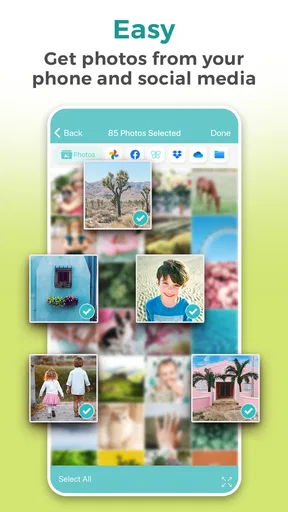
- Upload photos directly from your phone’s gallery or social accounts.
- Supports repeat orders, making it easy to print new memories regularly.
- Offers optional upgrades such as larger sizes, canvas, and photo books.
- Simple ordering process with delivery sent directly to your home.
Limitations of FreePrints
- Free print limits and offers may vary by country or promotional period.
- Shipping costs can make larger orders less economical than local printing.
- Print quality may differ depending on the original photo resolution.
- Some advanced products and upgrades can become relatively expensive.
- Delivery times are longer than picking up prints from a nearby store.
Other Releases by PlanetArt
View All
FreePrints Photo Tiles
Photography4.9

FreePrints Gifts
Photography4.8

FreePrints Photobooks
Photography4.8

FreePrints Photo Art
Photography4.8
Similar Picks in This Category
View All
Google Photos
Google LLC4.4

Gallery
Google LLC4.2

Picsart AI Photo Editor, Video
PicsArt, Inc.3.9

B612 AI Photo&Video Editor
SNOW Corporation4.1

BeautyPlus-Selfie Photo Editor
PIXOCIAL TECHNOLOGY (SINGAPORE) PTE. LTD.4.5

Remini - AI Photo Enhancer
Bending Spoons4.1
Frequently Asked Questions
What is FreePrints and how does it work?
FreePrints is a mobile photo-printing service that lets you select pictures from your phone, social media accounts, or cloud storage and order physical prints through the app. The service usually includes a limited number of free standard prints each month, while you pay for shipping and handling. Before confirming an order, review the available sizes, prices, delivery estimate, and any applicable restrictions.
Are FreePrints really free, or are there additional costs?
FreePrints offers complimentary standard photo prints within its monthly allowance, but the order is not completely cost-free because shipping and handling charges apply. You may also pay extra for larger prints, premium paper, enlargements, photo products, or additional copies beyond the free limit. The final checkout screen shows the total price, so check it carefully before submitting your order.
What photo sizes and products can I order with FreePrints?
The app primarily focuses on standard photo prints, but the exact selection may include different sizes, finishes, enlargements, collages, and personalized products depending on your location. Standard prints are generally the best option if you want to use the free monthly allowance. Image cropping can vary by size, so preview each photo and adjust its framing before placing the order.
How long does FreePrints take to deliver an order?
Delivery time depends on your country, the selected product, production workload, and the shipping method available at checkout. Standard prints may take several business days to process and arrive, while personalized products or larger orders can require additional time. The app normally provides an estimated delivery window, but this should be treated as an estimate rather than a guaranteed arrival date.
Is FreePrints safe to use, and what happens to my uploaded photos?
FreePrints requires access to selected photos or connected accounts so you can create an order, but you should review the permissions requested during setup. Use the app’s privacy policy to understand how images and account information are processed, stored, and shared with printing or delivery partners. If privacy is important to you, grant only the access needed and disconnect services you no longer use.
